Biggest Change Detection Web Content Monitoring Buying Mistakes (And How to Avoid Them)
Introduction
Change detection and web content monitoring tools have become essential for a wide range of electronics and technology tasks: tracking product page updates, monitoring firmware release notes, watching regulatory filings, or following competitor pricing. The category is often summarized by the phrase Change Detection Web Content Monitoring, which refers to services and software that detect and report changes to web pages or specific content fragments. Buyers frequently assume all solutions are equivalent, but small technical differences and operational choices greatly affect outcomes. This article outlines the most common purchasing mistakes people make when acquiring change detection tools and provides pragmatic guidance for avoiding them.
Why this matters for electronics professionals
In electronics, timely and accurate information can affect sourcing, manufacturing schedules, warranty claims, and compliance. An engineer tracking a PCB supplier's datasheet updates, a product manager watching price drops on critical components, or a compliance officer following safety notices all depend on reliable change detection. Choosing the wrong monitoring approach can lead to missed alerts, wasted work hours, or decisions based on stale data.
Common buying mistakes — and how to avoid them
This section lists principal mistakes buyers make, explains the technical reasons they matter, and offers clear avoidance strategies.
Mistake 1: Assuming frequency equals accuracy
Many buyers equate high polling frequency with better monitoring. While frequent checks reduce time-to-notice, they do not guarantee useful results. High frequency increases noise, server load, and chances of being rate-limited or blocked by target websites.
How to avoid it: Define the right frequency by use case. For regulatory pages or release notes, hourly checks may be sufficient. For flash sales or inventory drops, minute-level checks may be justified. Prefer solutions that allow intelligent scheduling (business hours, backoff on blocks) and delta-based sampling rather than blind high-frequency polling.
Mistake 2: Ignoring dynamic and JavaScript-rendered content
Modern websites render important content client-side. Tools that only fetch raw HTML will miss updates that appear after JavaScript execution.
How to avoid it: Choose a tool with a headless browser or JavaScript-rendering capability, or one that supports API endpoints provided by the monitored site. Verify it can render dynamic content like lazy-loaded sections, infinite scroll, and content inside iframes.
Mistake 3: Not validating selectors and change scopes
Out-of-the-box monitoring of whole pages often causes noisy alerts. Buyers neglect to specify precise selectors (DOM paths, CSS selectors, XPath) and end up alerted for irrelevant changes like timestamps, ads, or analytics scripts.
How to avoid it: Test and configure content selectors during a trial period. Prefer tools that allow CSS/XPath selectors, text-only comparisons, or regular expressions to target meaningful content. Use visual diff or ignoring rules for common noisy elements.
Mistake 4: Overlooking false positives and diff quality
Raw HTML diffs or line-by-line changes can produce long, unreadable alerts. False positives from minor formatting or whitespace changes waste time.
How to avoid it: Evaluate diff algorithms (semantic, text-only, DOM-aware). Prioritize platforms that provide summarized diffs, highlighted changes, or contextualized summaries. Confirm the tool supports normalization (strip timestamps, standardize whitespace) and custom ignore rules.
Mistake 5: Picking solely on price
Free or low-cost services can be attractive, but cost-cutting typically sacrifices reliability, rendering, or support. Hidden rate limits, unreliable notifications, or poor retention can create operational risk.
How to avoid it: Balance cost with required features. Assess the total cost of ownership including API access, integrations, storage of historical versions, and support. Validate SLAs for uptime and notification delivery if monitoring is business critical.
Looking for the best Electronics deals on Amazon?
Shop Amazon →Mistake 6: Failing to test notification delivery and integration
An alert is only useful if it arrives where it needs to be — email, SMS, Slack, webhook, or enterprise messaging. Buyers sometimes assume all channels are equal and do not validate end-to-end integration.
How to avoid it: Run integration tests before committing. Verify webhook retry policies, message formats, rate limits, and authentication. Ensure the service can deliver to enterprise tools and has clear documentation for custom integrations.
Mistake 7: Neglecting privacy, legal, and ethical constraints
Scraping can violate site terms of service or trigger legal issues when done at scale. Monitoring pages behind login, paywalls, or on private intranets raises data governance concerns.
How to avoid it: Confirm compliance — read target site policies, obtain permission when necessary, and prefer services that support authenticated monitoring securely (OAuth, cookies) and respect robots.txt and rate limits. Check your organization's legal counsel if monitoring sensitive sources.
Product review & analysis: Change Detection Web Content Monitoring
The term Change Detection Web Content Monitoring encompasses a range of products from simple page watchers to enterprise-grade platforms. Below is a neutral, technical analysis of the main capability areas buyers should evaluate.
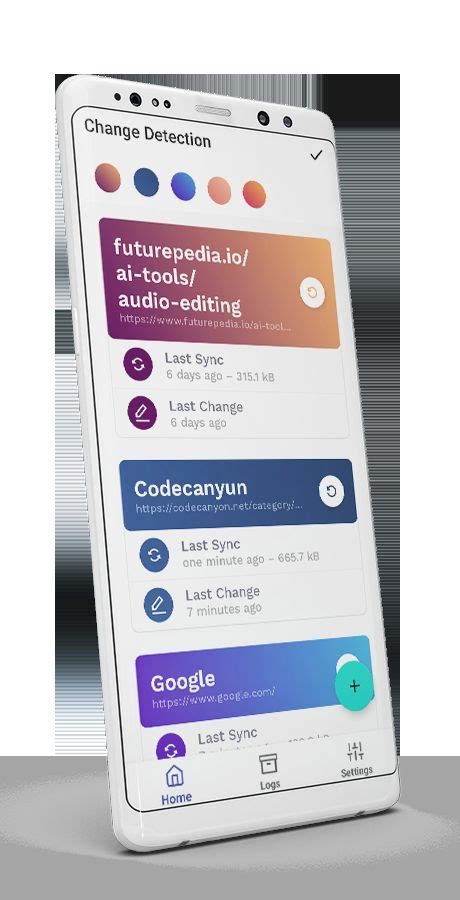
Core detection methods
Detection methods fall into three categories:
- HTTP fetch and text diff: Request raw HTML and compare text. Fast and resource-light but fails for JS-rendered content.
- Headless browser rendering: Use Chromium/Puppeteer or similar to render page fully before diffing. Captures dynamic content but consumes more resources.
- API or direct feeds: When sites offer RSS, JSON APIs, or webhooks, these are the most reliable and efficient sources of change events.
Alerting and delivery
Robust monitoring supports multiple notification channels, delivery guarantees, and message customization. Enterprise use cases demand webhook signing, retry logic, and bulk change summaries to avoid alert fatigue.
Scalability and rate limits
Large-scale monitoring (thousands of pages) requires distributed worker infrastructure and IP management. Some vendors offer proxy pools or residential IPs to avoid blocks. Buyers must consider whether a vendor's scaling model fits expected growth.
Historical retention and auditability
In electronics and regulated industries, retaining historical snapshots and diffs is essential for traceability. Look for configurable retention windows, exportable archives, and searchable history with timestamps.
Security and authentication
Monitoring pages behind authentication needs secure credential handling. Support for token-based login flows, cookie storage, CAPTCHA handling options, and role-based access for users are important for enterprise adoption.
Usability and onboarding
Non-technical teams benefit from simple UI for adding monitors, visual selectors, and rule templates. Conversely, technical teams need API-based management, templating, and bulk import/export features.
Pros & Cons
- Pros
- Timely awareness of content and price changes that impact supply and inventory.
- Automation reduces manual checking and speeds decision cycles.
- Can provide audit trails and historical context for compliance and incident analysis.
- Flexible notification channels integrate with existing workflows (e.g., Slack, webhooks).
- Cons
- Dynamic content and single-page apps require more sophisticated (and costly) rendering.
- High-frequency polling risks IP blocks and increased operational costs.
- Poorly configured selectors cause noise and false positives.
- Privacy and legal considerations add complexity for authenticated or private sources.
Comparison table: key features to compare
| Feature | Simple page watchers | Headless browser monitors | Enterprise monitoring platforms |
|---|---|---|---|
| JavaScript rendering | Usually no | Yes | Yes, with scaling options |
| Custom selectors (CSS/XPath) | Basic | Advanced | Advanced with templates |
| Notification channels | Email only | Email, webhooks, integrations | Email, SMS, webhooks, SIEM, enterprise apps |
| Historical retention | Short | Configurable | Configurable with exports and archives |
| Scalability | Low | Medium | High |
| Authentication support | Limited | Good | Comprehensive (SAML/OAuth/API) |
| Typical buyer | Individual researchers | SMBs, startups | Enterprises, compliance teams |
Real-world use cases
Concrete examples help clarify requirements:
- Component sourcing: A procurement team monitors distributor pages for stock changes and BOM replacements. They need reliable, authenticated monitoring for supplier portals and rapid alerts for in-stock notifications.
- Firmware updates: Engineers watch vendor release notes for critical security patches. They require accurate detection of the specific release section and historical retention for audits.
- Price monitoring: Product managers track competitors' pricing windows. They need high-frequency checks during promotions and tools to normalize currencies and VAT variations.
- Regulatory & compliance: Legal teams monitor recall notices and standards updates. They prioritize audit trails, retention, and alerts that can feed compliance ticketing systems.
Buying guide: what to evaluate before purchasing
Follow these steps when choosing a change detection product.
Discover deals on Electronics — updated daily.
See Deals →1. Define the monitoring scope
Decide whether monitoring will cover public product pages, authenticated vendor portals, APIs, or internal intranet pages. Each scope has distinct technical and legal considerations.
2. Match detection method to content type
If target pages are JavaScript-heavy or require login, prefer headless browser rendering. For API-friendly sources, use direct feeds where possible.
3. Establish frequency & SLAs
Set acceptable time-to-detect for different monitors and confirm the vendor can meet those SLAs for alert delivery and uptime. Determine whether the vendor provides guaranteed notification delivery or retry policies.
4. Validate selector and diff controls
Inspect the UI for selector creation and test diff types (text, DOM, visual). Ensure the product supports ignore rules and normalization for noisy elements.
5. Test notifications and integrations
Run end-to-end tests for each required channel (webhook payloads, Slack formatting, SMS reliability). Verify that webhook security (signing, secret rotation) and message schemas meet internal standards.
6. Review privacy, security, and compliance
Ask how credentials are stored and whether the vendor supports encrypted storage, role-based access, and audit logs. Confirm data residency and retention policies where relevant.
7. Consider scalability and IP management
For thousands of monitors, ask about proxy pools, IP rotation strategies, and how the service mitigates blocks. Ensure the cost model supports scale without sudden price spikes.
8. Inspect historical data access
Ensure the tool can export historical snapshots and diffs in machine-readable formats for forensic analysis and compliance needs.
9. Evaluate support and onboarding
Check for technical onboarding, availability of templates, and the responsiveness of support. For enterprise purchases, confirm the availability of an account manager and escalation paths.
10. Run a realistic pilot
Before committing, run a pilot with representative pages and integrations. Measure false positive rates, notification latency, and ease of tuning selectors. Use pilot results to negotiate terms and required service levels.
Checklist: questions to ask vendors
- Do you render JavaScript and support single-page applications?
- What notification channels and retry policies do you support?
- How do you manage credentialed monitoring securely?
- Can selectors be customized using CSS/XPath/Regex?
- What are your rate limits, and how do you prevent IP blocks?
- How long do you retain historical snapshots, and can they be exported?
- Do you provide signed webhooks and documentation for integrations?
- What SLAs do you provide for uptime and alert delivery?
Conclusion
Change detection and web content monitoring are deceptively simple in concept but technically nuanced in practice. The biggest buying mistakes stem from mismatched expectations: assuming frequency substitutes for accuracy, overlooking dynamic content, and neglecting integration or compliance requirements. By defining clear use cases, testing realistic pages, validating selectors and alerting pathways, and balancing cost with reliability, buyers in the electronics sector can select solutions that reduce risk and accelerate decision-making. A disciplined pilot, an explicit checklist for vendors, and attention to legal and operational constraints will avoid common pitfalls and ensure the monitoring solution becomes a dependable part of the workflow.